
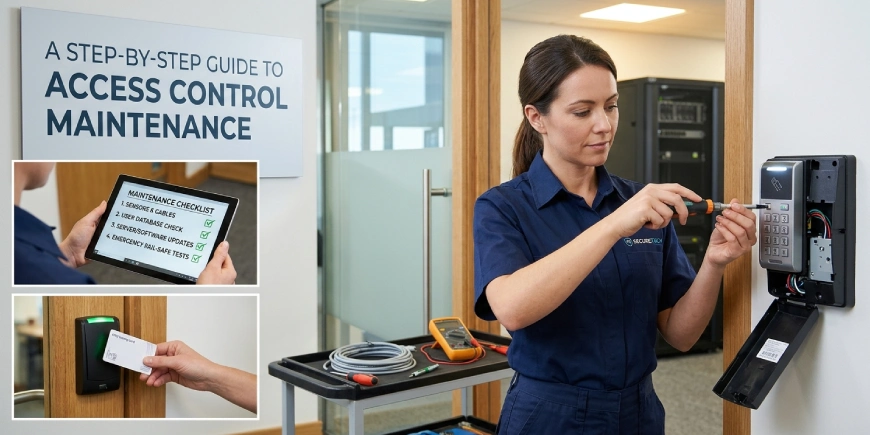
An access control system helps businesses manage who can enter a building, which areas they can access and when entry is permitted. But installing readers, electronic locks and door controllers is only the beginning. Regular access control maintenance helps keep these components working properly and reduces the risk of access failures.
Whether you manage an office, warehouse, school, apartment building, or industrial facility, maintaining your system is important for both security and daily operations. A professional security camera installation company in Canada can also help coordinate access control with CCTV and other security infrastructure.
Why Is Access Control Maintenance Important?
An access control system may appear to work normally while developing problems that are not immediately visible. A failing door sensor, damaged reader, outdated user permission, or weak backup battery can affect system performance.
Regular maintenance helps businesses:
- Keep authorised entry points working correctly.
- Identify damaged readers, locks and wiring.
- Remove access for former employees and contractors.
- Check door alarms and access event records.
- Reduce unexpected system downtime.
- Maintain reliable entry management.
- Identify opportunities for upgrades or expansion.
For commercial properties, even one malfunctioning access point can interrupt operations or create an unwanted security gap.
What Components Need Regular Maintenance?
Before starting maintenance, understand the main parts of your access control system.
Card Readers and Keypads
Readers and keypads allow users to enter through authorised credentials or codes. Check for physical damage, loose connections, unresponsive buttons and inconsistent credential recognition.
Electronic Locks and Door Hardware
Electric strikes, magnetic locks and electronic locking devices control the physical door. Check their operation, alignment, mounting and condition.
Door Position Sensors
These sensors report whether a door is open or closed. Incorrect readings can affect door-held-open alerts and other monitoring functions.
Controllers and Power Supplies
Controllers process access requests, while power supplies provide energy to system components. Check their status indicators, connections, enclosure condition and backup power arrangements.
Access Control Software
The management platform stores user permissions, schedules, event records and system settings. It needs regular reviews and appropriate software maintenance.
A Step-by-Step Guide to Access Control Maintenance
A consistent maintenance process makes it easier to identify issues and keep records of completed work.
Step 1: Inspect All Access Points
Begin by checking every controlled door, gate, or entry point. Look for damaged readers, loose mounting, exposed wiring, worn door hardware and signs of tampering.
Also check whether doors close properly and whether surrounding hardware has changed since the original installation.
Step 2: Test Card Readers and Keypads
Test a sample of authorised credentials and confirm that readers respond correctly.
Check that:
- Valid cards or credentials are accepted.
- Disabled credentials are rejected.
- Keypads respond consistently.
- Access schedules work as configured.
- Readers communicate with the controller.
Do not rely only on the reader’s indicator light. Confirm that the access event appears correctly in the management system.
Step 3: Check Electronic Locks and Door Sensors
Test each controlled door to confirm that the locking device and door sensor respond as expected.
Check for delayed locking, unusual noises, poor alignment, loose hardware and incorrect door status reports.
Important: Emergency egress, fire alarm interfaces and fail-safe or fail-secure behaviour must be checked by qualified personnel according to the approved system design and applicable safety requirements. Never disable safety functions as a troubleshooting shortcut.
Step 4: Review User Permissions
Employee roles and building access needs change over time. Review the access database to confirm that each person has the appropriate permissions.
Your review should include:
- Removing credentials belonging to former employees.
- Disabling lost or stolen cards.
- Reviewing contractor and visitor access.
- Checking temporary access expiry dates.
- Removing unnecessary administrator privileges.
- Confirming access schedules and restricted zones.
The RCMP Access Management Guide discusses access permissions, electronic access systems, emergency considerations and the importance of controlling authorized entry. Its guidance is particularly useful when reviewing a facility’s access management procedures.
Step 5: Inspect Controllers, Wiring and Power
Check controller enclosures, cable connections, power supplies and backup batteries. Look for loose terminals, corrosion, overheating, damaged insulation, or warning indicators.
Where backup power is installed, confirm its condition and operation using the manufacturer’s approved test procedure. Do not disconnect or alter power connections without appropriate technical authorization.
Step 6: Review Software and System Security
Access control software should be maintained alongside the physical equipment.
Review system alerts, event logs, user accounts and configuration changes. Check for available firmware or software updates and apply them through an approved process after considering compatibility and operational impact.
Use individual user accounts where supported, limit administrator permissions and protect remote access. Keep configuration backups and maintenance records so the system can be restored if a problem occurs.
Step 7: Test System Integration
Many commercial access control systems work with CCTV, alarms, intercoms and other security equipment.
Check that important integrations still operate as intended. For example, confirm that a door event can be associated with the correct camera view when the system supports this function.
Also review alarm notifications, monitoring connections and any configured emergency interfaces.
Step 8: Document Findings and Corrective Work
After inspection and testing, record the results. A useful maintenance report should include:
- Date and location of the inspection.
- Doors and devices tested.
- Issues identified.
- Repairs or adjustments completed.
- Parts replaced.
- Software or configuration changes.
- Outstanding recommendations.
This record helps facility managers track recurring faults and plan future maintenance.
How Often Should Access Control Systems Be Maintained?
There is no single maintenance interval suitable for every building. The schedule should consider manufacturer recommendations, equipment condition, traffic levels, site risk, environmental conditions and applicable requirements.
A practical approach is to establish:
- Routine visual checks by trained site staff.
- Scheduled technical inspections by a qualified service provider.
- Additional checks after equipment changes, incidents, or reported faults.
- Regular reviews of user permissions and system accounts.
Busy entrances, outdoor gates and critical restricted areas may need closer attention than low-use internal doors.
Common Access Control Problems to Watch For
Some issues are easy to overlook until they affect building operations.
Common warning signs include:
- Cards or key fobs failing intermittently.
- Doors not locking or releasing as expected.
- Readers showing unexpected error indicators.
- Door-held-open or forced-door alerts appearing incorrectly.
- Access events missing from system logs.
- Backup power warnings.
- Software communication errors.
- Repeated controller or network disconnections.
If a fault affects emergency exit operation or the safe operation of a door, treat it as a priority and arrange an appropriate technical inspection.
When Do You Need Access Control Repair, Upgrade, or Replacement?
Routine maintenance can resolve minor issues, but some problems require more extensive work.
An access control system installation or upgrade may be worth considering when the existing platform cannot support additional doors, newer credentials, required integrations, or current management needs.
Replacement may be appropriate when hardware is damaged beyond repair, software is no longer supported, or repeated faults make the system unreliable.
A professional access control contractor should assess the existing equipment before recommending a full replacement. In many cases, selected components can be repaired or upgraded while keeping compatible parts of the system.
Access Control Maintenance in Halifax, Ottawa and Calgary
Businesses operating in Halifax, Ottawa and Calgary should consider their building type, entry traffic, environmental conditions and system requirements when planning maintenance.
An Access Control System in Calgary, for example, may have outdoor equipment exposed to seasonal weather. Facilities in Halifax or Ottawa may also need maintenance plans that account for local conditions and building use.
A professional service provider should inspect the actual installation, explain any faults, identify compatible replacement parts and provide a clear record of completed work.
Final Thoughts
Access control maintenance is an ongoing part of protecting a building. Regular inspections, credential reviews, door testing, software checks and proper documentation help keep the system dependable as business needs change.
For organisations planning new access control installation, system maintenance, or integration with CCTV and structured cabling, AlfaDefence.io provides security infrastructure services for commercial, industrial and residential properties in Canada.
FAQs
1. What is included in access control maintenance?
Access control maintenance includes inspecting card readers, keypads, electronic locks, door sensors, controllers, power supplies and software. It also involves testing credentials, reviewing user permissions, checking system alerts, verifying integrations and documenting faults or repairs to help maintain reliable operation.
2. How often should an access control system be maintained?
Maintenance frequency depends on manufacturer recommendations, building usage, equipment condition, environmental exposure and security requirements. Businesses should establish routine checks and scheduled technical inspections, with additional testing after system changes, reported faults, or security incidents.
3. Can an access control installer provide maintenance services?
Yes. Many access control installers also provide maintenance, troubleshooting, repairs and system upgrades. A qualified service provider can inspect installed equipment, test door operation, review software settings, identify compatibility issues and recommend corrective work based on the system’s condition.
4. What are the common signs that an access control system needs repair?
Common warning signs include readers rejecting valid cards, doors failing to lock correctly, repeated communication errors, missing access logs and unexpected alarms. Backup power warnings and intermittent controller faults should also be investigated before they lead to wider system problems.
5. Can access control systems be integrated with CCTV?
Yes. Compatible access control systems can integrate with CCTV to provide video context around door events and authorized or unauthorized entry attempts. The available features depend on the equipment and software. Proper configuration and testing are important to ensure both systems exchange information correctly.
6. Should businesses upgrade or replace an old access control system?
An upgrade may be suitable when existing equipment is still compatible but needs additional features, readers, or integrations. Replacement may be necessary when hardware is unreliable, software is unsupported, or the system cannot meet current requirements. A technical assessment helps determine the most practical option.
7. Do access control systems in Halifax, Ottawa and Calgary need different maintenance?
The basic maintenance principles are similar, but local building conditions, equipment exposure, usage and applicable requirements can affect the maintenance plan. Businesses should follow manufacturer guidance and have their specific installation assessed rather than applying one schedule to every location.